ADHD-friendly daily planner · Printable
Move at the speed of you.
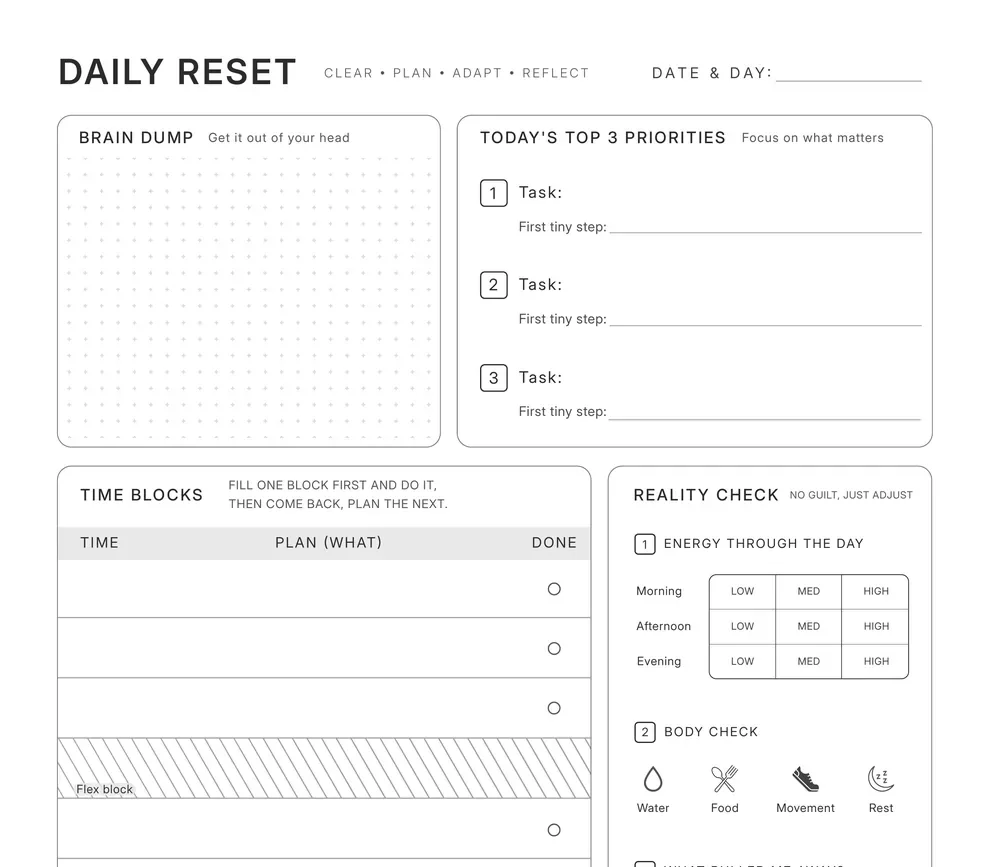
Meet Daily Reset
A planner that starts when you do.
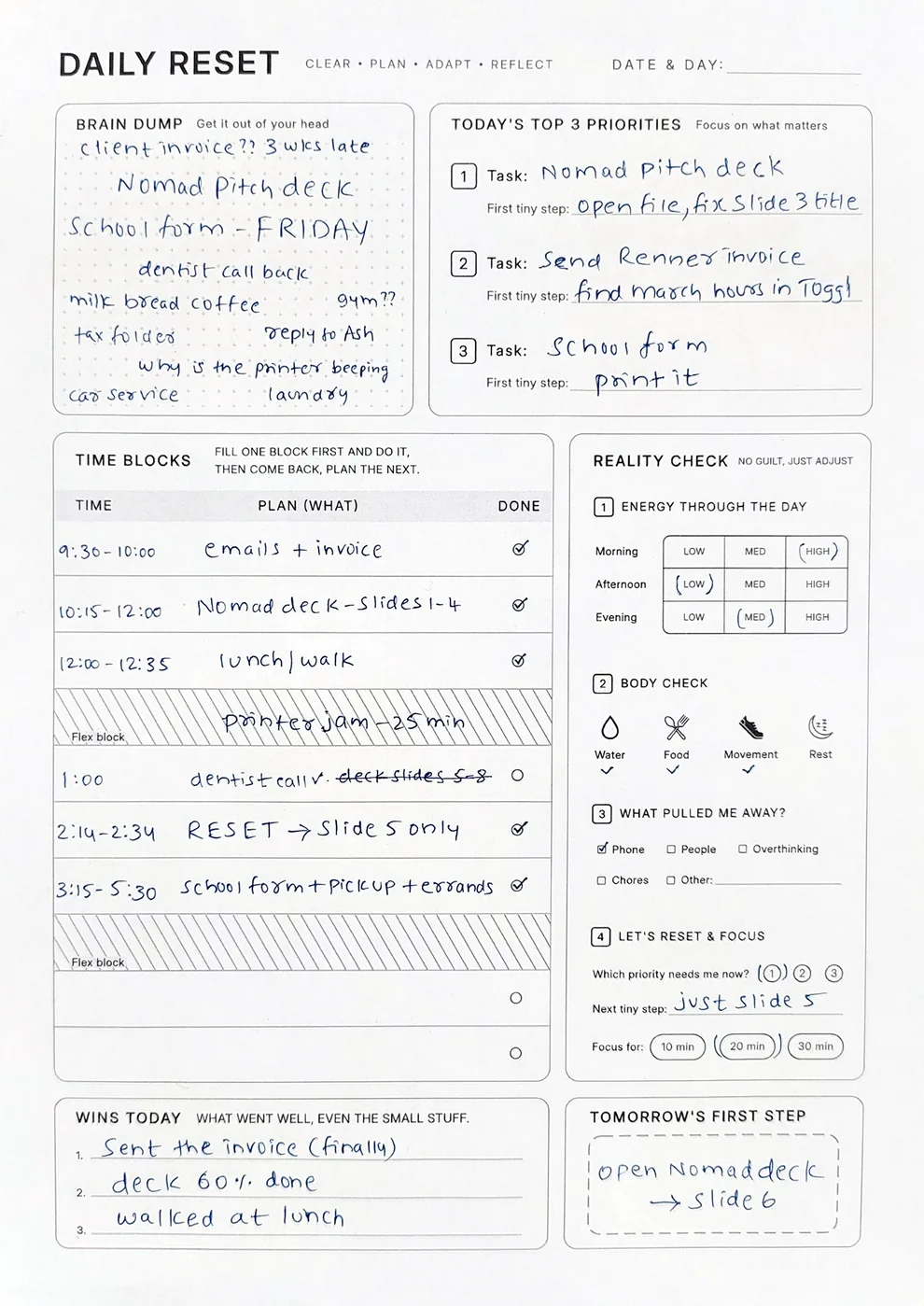
Start with the day you have, at your own pace.
Many planners arrive with the day already divided into preprinted hours. Start late or miss an hour, and the empty slots stay on the page.
Daily Reset leaves the hours to you. It's one undated page, in A4 and US Letter, so any day is a good day to start. Use what you need. Leave the rest blank.
Six sections, four steps.
- ClearDecide what mattersBrain Dump and Today's Top 3
- PlanOne session at a timeTime Blocks
- AdaptFind your way back when the day driftsReality Check
- ReflectClose the dayWins Today and Tomorrow's First Step
Follow one day, start to finish.
Clear•Plan•Adapt•Reflect
Clear your head. Set your direction.
Get it all out, then pick up to three things and a first tiny step for each.
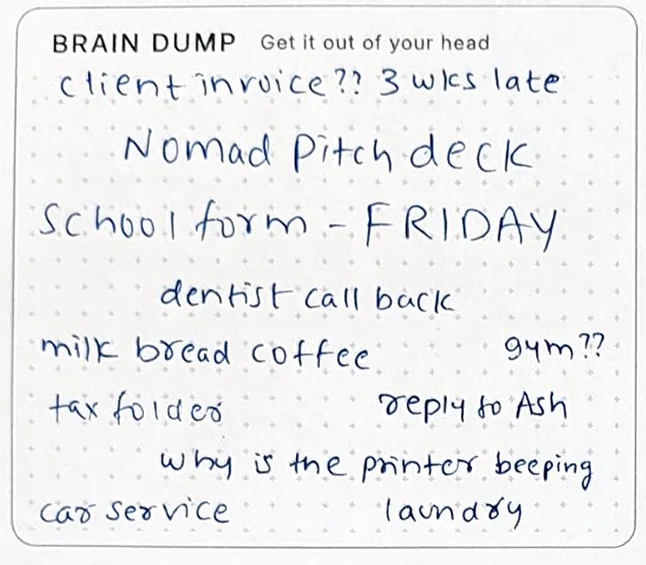
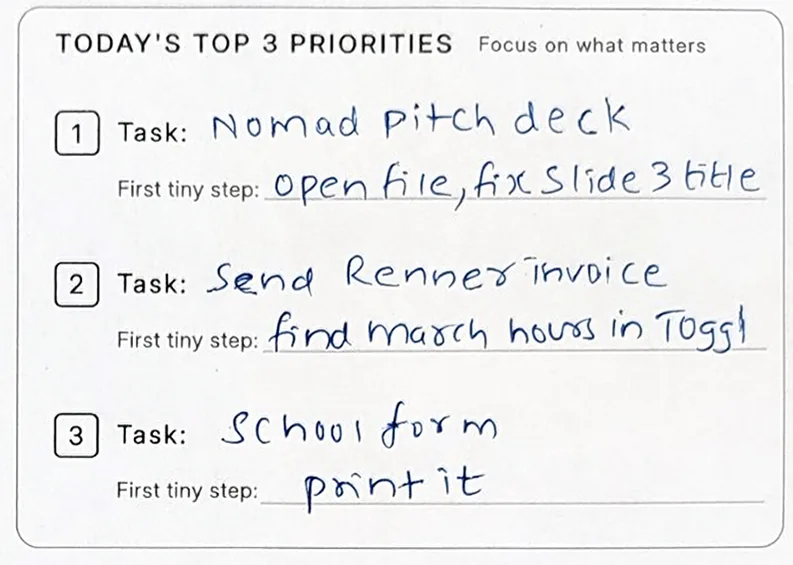
Example. Brain Dump, then Today's Top 3 Priorities.
Capturing everything doesn't mean committing to everything. Eleven things landed in this Brain Dump. Three became Today's Top 3. The rest can stay where they are.
Clear•Plan•Adapt•Reflect
Your time. Your terms.
A row is a session, not an hour.
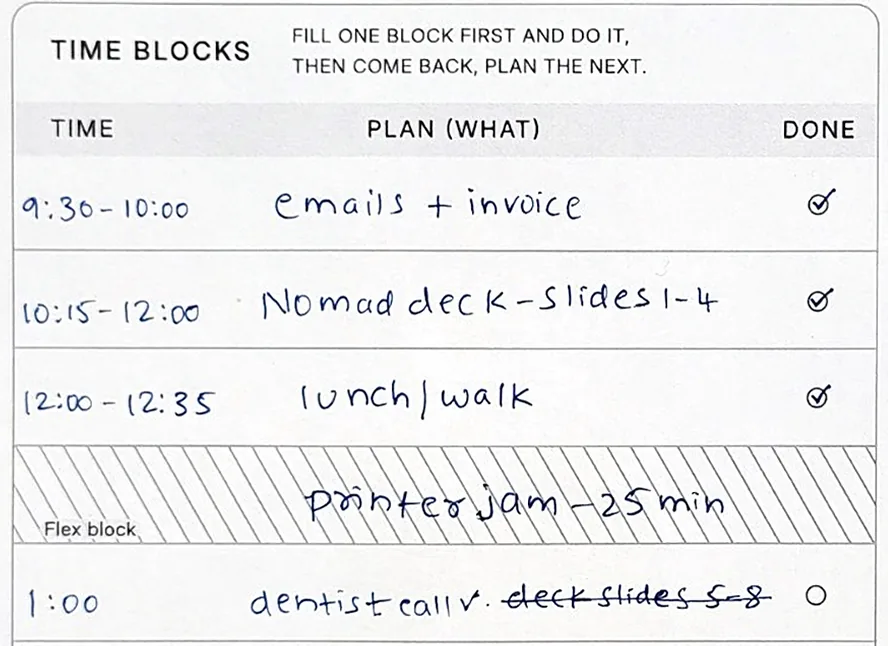
- Write a start time and what you'll do.
- Work on it. Write the end time when you stop.
- Then plan the next session, not the whole day.
A planner shouldn't hold a grudge. You write the start and stop times yourself, so a late start leaves no empty hours behind.
Clear•Plan•Adapt•Reflect
Your way back in, whenever you need it.
Know where you are. Decide what to do next.
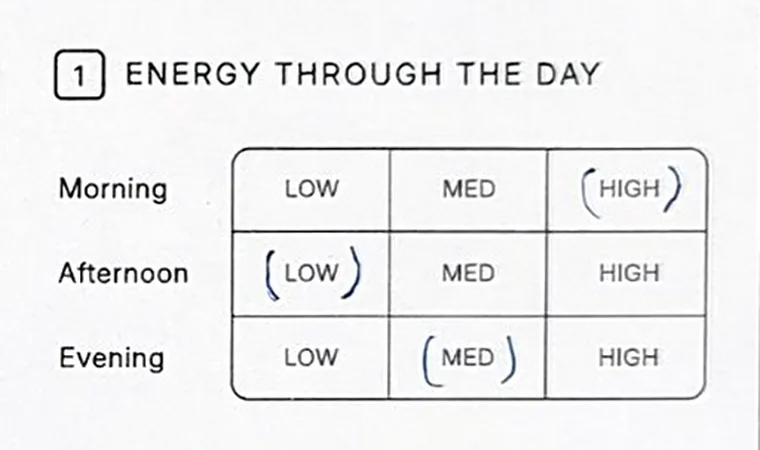
Energy through the day. Circle low, med or high.
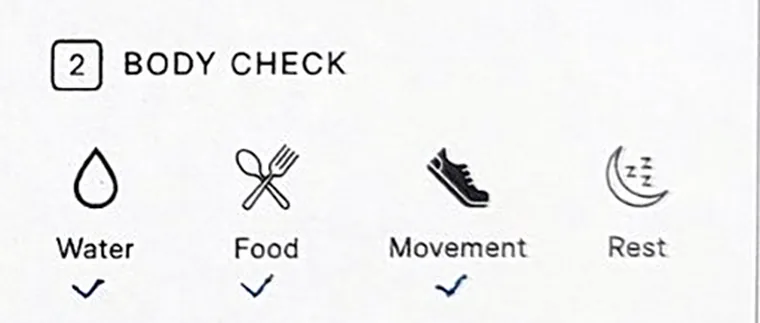
Body check. Water, food, movement, rest.
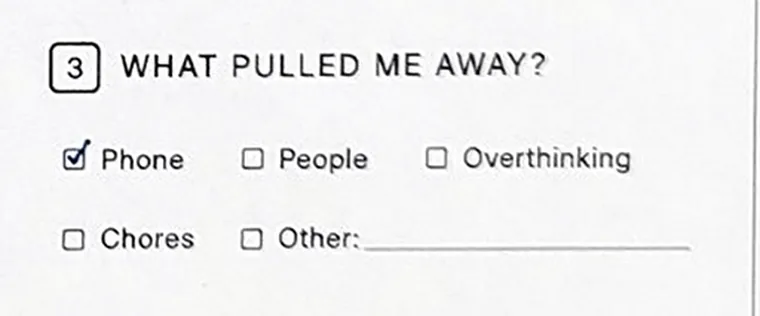
What pulled me away? Tick what fits.
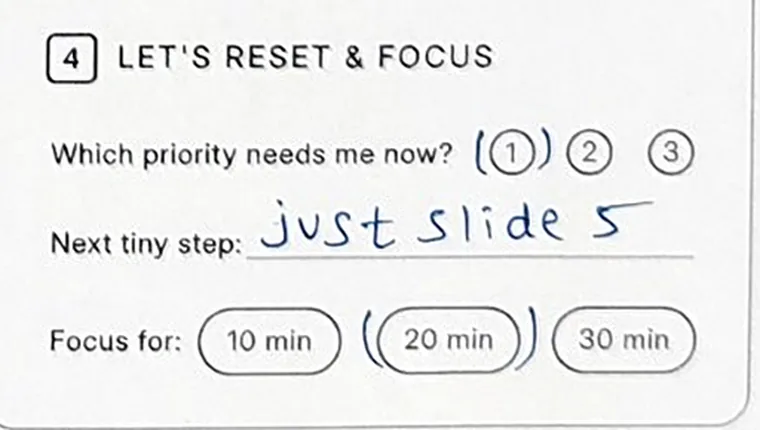
Let's reset & focus. One priority, one tiny step, 10, 20 or 30 minutes.
Example. Rest is unticked. Nothing here is a score.
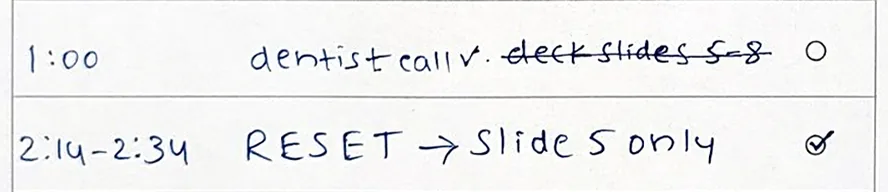
Drift happens. What counts is getting back. At 1:00 the deck stopped and the phone took over. Reality Check sits on the same page for that moment, at any hour. Then the way back in goes into Time Blocks, as one more session.
Clear•Plan•Adapt•Reflect
Close today. Leave yourself a first step for tomorrow.
You decide what counts, and where tomorrow starts.
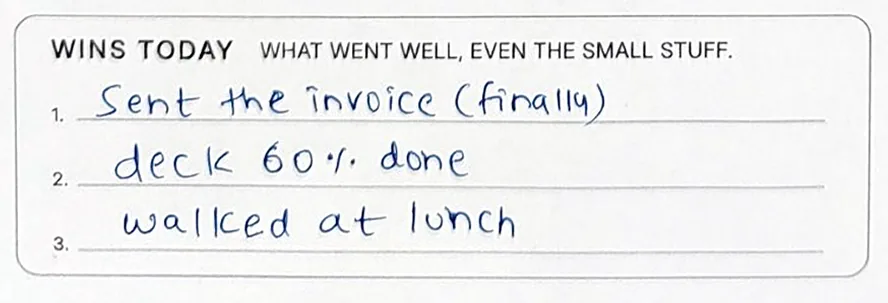
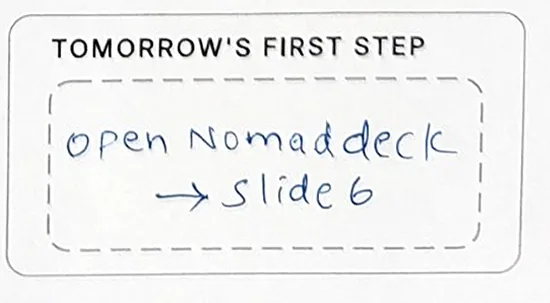
Example. Wins Today and Tomorrow's First Step.
Three lines for what went well, even the small stuff. One box for where tomorrow begins. The deck isn't finished, and the page doesn't ask it to be.
Here's exactly what lands in your inbox.
- Daily Reset plannerOne page, as A4 and US Letter PDFs
- How to Use guideTwo pages, with worked examples
$5. Paid once on Payhip. Instant digital download.
Print it. Write on it. Make it yours.
Print the A4 or US Letter file at Actual Size or 100%, never Fit to Page. Still shrinking? Open the PDF in Chrome or Edge and print from there.
Import the PDF into GoodNotes, Notability, Noteshelf or Xodo and write on it with a stylus. It isn't a fillable form.
Is it right for you?
It fits if
- You want to plan from whenever your day starts.
- You'd rather plan one session at a time than a whole day.
- You want a way back on the same page when the day drifts.
- You want one page, not a system to maintain.
It's the wrong tool if
- You want automatic scheduling, reminders or timers.
- You need your plan to sync across devices.
- You want a form you type into.
Why I made it
I used to plan my days on my own hourly tracker, twenty rows down the page. When I started late, the empty rows sat there, and after a few weeks the old pages read like a record of missed hours. I stopped using it.
Daily Reset is the planner I made instead: no hours preprinted, less space, on purpose. I decide what the day holds, and when the day changes, my plan can too.
Questions? Answers.
Do I need an ADHD diagnosis?
No. It's designed with ADHD in mind, which is the hardest version of the problem to design for. And it's just as usable if you're undiagnosed, overloaded, burnt out, or just stretched thin.
What sizes do I get?
Both A4 and US Letter, at 300 DPI. Use whichever your printer takes.
Will it print properly at home?
Yes. Sized to exact trim with generous safe margins, tested at 300 DPI. Just choose Actual Size / 100% — never “Fit to Page.”
Can I use it on my iPad?
Yes — import the PDF into GoodNotes, Notability, Noteshelf or Xodo and write on it with a stylus.
Can I edit or type into the PDF?
It's a print-ready file, not an editable template. Everything you'd want to change is already a blank field.
Isn't one page a day a lot of printing?
Print a week at a time. It's greyscale and low-ink by design. Or use it on your tablet and print nothing at all.
Why only 8 time blocks?
Because a row isn't an hour — it's a session, and you choose the length. Email, messages and admin can share one row. Most full days fit in six or seven. Two extra striped Flex rows are there for whatever turns up. The page is for the sessions that matter, not every hour you're awake.
Is it dated?
Undated. Start on a Wednesday in March if you want. Nothing expires.
What if I stop for a while?
Print a fresh page and start. Nothing to rebuild, no streak to break.
Is this a physical product?
No. It's an instant digital download — the files are yours the moment you buy.
Ready when you are.
Start with the day you have.
Get Daily Reset$5. Paid once on Payhip. Instant digital download.